Take a Picture of Food to Count Calories: How It Works
You can count calories by taking a picture of your food. Snap your plate, and AI identifies every item, estimates the portions, and gives you calories, protein, carbs, and fat in seconds. It's fast enough to do at a real family dinner, not just a perfectly plated one. This guide covers exactly how it works in Cal360, and how to shoot for the most accurate results.
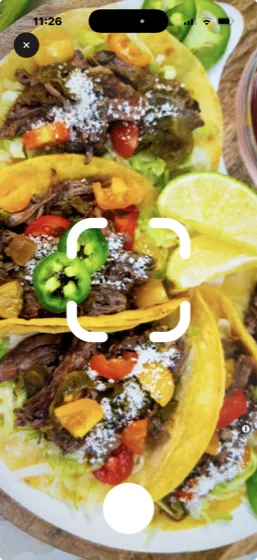
Why photo logging changes everything
The old way: search "chicken burrito," scroll past 40 near-identical database entries, guess which one matches yours, then estimate grams. The photo way: point, snap, confirm. When logging takes five seconds, you do it at every meal, and consistency is the single biggest predictor of whether calorie counting works for you.
How to count calories from a photo in Cal360
- Tap the + button on your Cal360 dashboard and choose Scan Food.
- Snap the photo. Frame the whole plate from slightly above, in decent light, before you start eating.
- Review the breakdown. Cal360 lists every food it found, like grilled salmon, quinoa, and avocado, with portion estimates and a full calorie and macro count.
- Adjust and save. Bump a portion up or down, add a sauce it couldn't see, and save. Your daily calorie ring and macro bars update instantly.
5 tips for the most accurate photo scans
- Shoot from a 45° angle or above so the AI can judge volume, not just area.
- Get the whole plate in frame so cropped food doesn't become guessed food.
- Use natural or bright light. Dim restaurant lighting still works, but brighter is better.
- Photograph before eating. A half-eaten plate reads as a half portion.
- Add what the camera can't see. Cooking oil, butter, and sugary drinks are easy to miss, so a quick edit keeps your log honest.
Wrapped, packaged, or too dark to shoot? Use Cal360's barcode scanner for packaged foods, or just say what you ate and let voice logging handle it.
From photos to results
Every scan feeds your bigger picture: a personalized daily calorie and protein target built during onboarding, live macro progress bars, weight-trend charts, and streaks that keep you honest. Combined with AI weekly meal plans, photo logging turns "I should track my food" into a habit that takes less than two minutes a day.
Snap Your Next Meal
See the full calorie and macro breakdown before your food gets cold. Free trial, pay later, cancel anytime.
Start Tracking for Free