Calorie Counter That Syncs with Apple Health: How It Works
Calories have two sides: what you eat and what you burn. A calorie counter that ignores Apple Health only sees half the picture. Cal360 connects both, your logged food on one side and your iPhone and Apple Watch activity on the other, in a single daily dashboard.
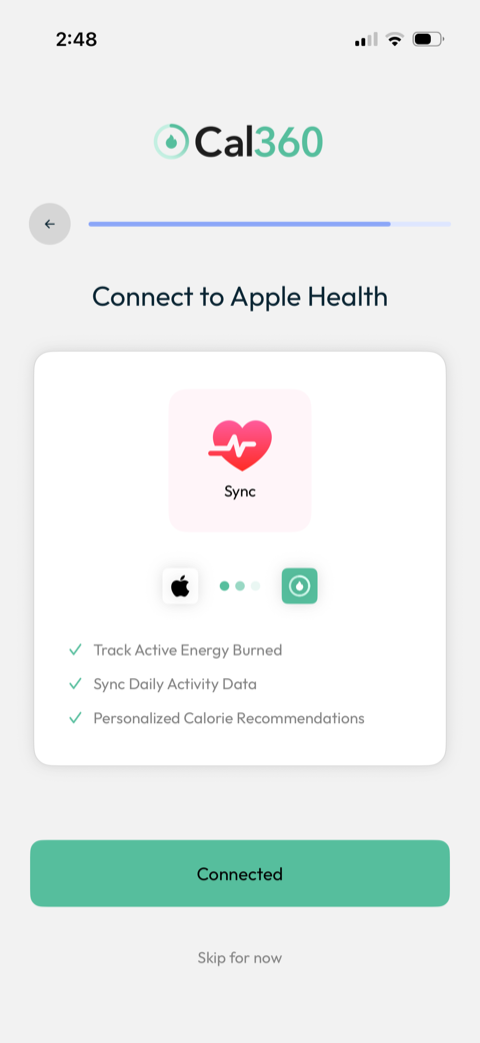
What the Apple Health sync does
- Tracks active energy burned. Workouts and daily movement recorded to Apple Health flow into Cal360 automatically.
- Syncs daily activity data. Steps and activity appear alongside your food log. The dashboard shows calories burned and steps taken (against a 10,000-step goal) next to your calorie ring.
- Personalizes calorie recommendations. Your real activity level informs your daily target instead of a static guess.
Exercise earn-back: make active days count
During setup, Cal360 asks: "Want to adjust your daily goal to include calories you burned?" Say yes and exercise adds calories back to your budget, so a run might turn a 1,600-calorie day into 1,700. Why this matters:
- Hard training days don't leave you under-fueled (and ravenous tomorrow).
- Movement gets rewarded visibly, which is a genuinely effective motivator to take the walk.
- Your deficit stays what you chose, so the target flexes with your real burn instead of drifting.
Prefer a fixed target regardless of activity? Skip it, because earn-back is optional and reversible.
Setting it up in Cal360
- During onboarding, tap Connect to Apple Health (or enable later in Settings).
- Grant access to active energy and activity data in the iOS permission sheet.
- Choose whether burned calories adjust your daily goal.
- Done. Your dashboard now shows eaten, burned, and steps in one view.
One source of truth
With Apple Health connected, the whole loop lives in one place: your personalized calorie target, effortless logging by photo, voice, or barcode, your real activity, calorie rollover for flexible weeks, and a Progress tab tracking your weight trend against your goal. No juggling three apps to answer one question: am I on track today?
Connect Your Whole Day
Food, activity, and progress in one dashboard. Free trial, pay later, cancel anytime.
Start Tracking for Free